20/10/2026 00:37
Can Shoppers Understand the Basket Without Seeing It? TikTok Photo Alt Text for Cambodian Shops

A basket photograph can show a removable lid, a shallow interior or handles that sit above the rim. But those details may never reach a shopper who uses a screen reader. For a Cambodian basket business promoting products on TikTok, preparing the photo description is part of preparing the offer. This guide follows a hypothetical Phnom Penh shop creating a photo post about storage baskets. It explains how to select informative pictures, write useful alternative text, check the published result and decide where SMM panel services fit into the discussion. The aim is an understandable product post and a clearer enquiry, without treating engagement counts as proof of customer understanding.
1. Start with the product distinction a shopper needs
In our hypothetical shop, customers confuse a round basket with a removable lid and an open rectangular tray. Both appear in attractive room photographs, but their shapes and openings suit different purposes. The owner wants a customer to identify the correct item before asking about availability. That is a more useful editorial objective than simply making the post look busy.
Write down the decision the photographs should support: choosing a covered container or an open organiser. Then identify the visible evidence needed for that decision. A whole-product view establishes shape; an open view shows the interior; a detail view explains the handle arrangement. Avoid building the post around decorations that obscure these differences. If a flower arrangement hides the opening, remove it for at least one photograph. Keep decorative styling secondary to the information a shopper needs.
2. Understand what TikTok photo alt text does
TikTok’s accessibility help describes alternative text as a way to explain photo content for screen-reader users. It documents a limit of 300 characters per description and supports adding descriptions during upload or after publication. This workflow concerns photo posts, so do not assume the same field describes every frame of a video.
Give the post caption and each photo description different responsibilities. Use the caption for the offer, confirmed product facts and enquiry instructions. Use alternative text to convey the meaningful visual information in its particular photograph. A caption saying that baskets are available for collection does not explain which basket has a lid. Equally, a description of the lid does not communicate current collection arrangements. Both pieces should make sense together, without requiring shoppers to reconstruct essential information from a string of decorative images.
3. Plan a small set of genuinely informative photographs
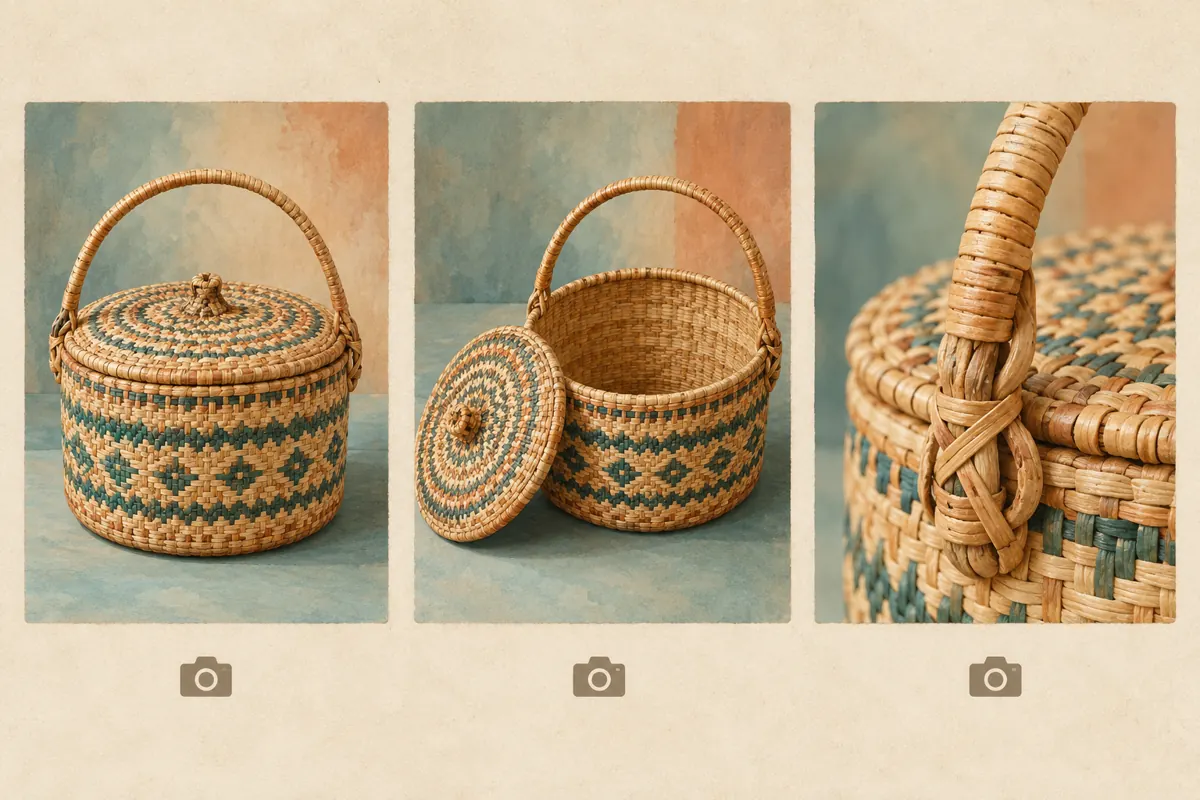
Prepare a shot list before writing. For the hypothetical lidded basket, use a complete view with the lid fitted, an open view with the lid beside it, and a close view of the handle attachment. Keep the same product in every frame. Similar-looking stock can have different rims or handle designs, so compare each photograph against the item the shop intends to offer.
Photograph against a background that separates clearly from the basket. Leave enough space to show the full silhouette and avoid filters that disguise colour or weave. If the post compares two models, establish stable names in the caption and keep those names consistent in the descriptions. A tray shown holding towels demonstrates an arrangement; it does not establish capacity for every towel size. Measure the actual product separately and publish confirmed dimensions where all readers can find them.
4. Describe the visible difference in ordinary language
A useful writing pattern is object, distinguishing feature and relevant arrangement. For a hypothetical photograph, the description might read: “Round tan woven basket with its fitted lid in place and one arched handle above it.” For the open view: “The same round basket with the lid resting beside it, showing an empty woven interior.” These descriptions explain what changes between pictures.
Compare those examples with “Beautiful premium basket, perfect for every Cambodian home.” That sentence supplies praise but almost no visual information. Avoid unsupported claims such as waterproof, food-safe, handmade or locally produced unless the business has separate evidence and an appropriate place to explain it. A photograph alone cannot establish those facts. Describe visible colour without assuming it identifies the material: tan strands might resemble several materials. If a supplier’s material description remains unverified, use a neutral visual description and resolve the product specification before promoting it.
5. Prepare Khmer wording around meaning
For a post aimed mainly at Khmer-speaking customers, prepare the descriptions in the language those customers use. This is a content choice for the individual post; it does not require changing the shop website’s language settings. Ask a fluent reviewer to check whether the wording clearly distinguishes a lid, rim, handle and interior. Literal translations can blur product differences even when individual words appear correct.
Keep product names consistent across photographs, the caption and staff replies. If the shop uses an English model name, retain that identifier and explain the surrounding detail naturally. Avoid filling a short description with two complete language versions when that crowds out the actual image information. Decide which audience the post serves first. For a genuinely bilingual audience, review whether concise bilingual wording remains understandable within the available field. Never assume that a language choice guarantees correct pronunciation on every customer’s device.
6. Add descriptions to the final photo sequence
TikTok’s documented upload route is to upload or create the photos, tap Next, then open More options on the posting screen. Select Add alternative text, enter a description beside each relevant photo and tap Done. Use the labels visible in your app; consult the official help if the interface differs.
Do this after settling the crop and photo order. A description mentioning a handle is inaccurate if the final crop removes it. Keep a simple working record pairing each approved photograph with its description, so a colleague can check the match before posting. Review the commercial caption separately for model names, confirmed availability and contact instructions. TikTok’s Community Guidelines also require its content disclosure setting when promoting a product, brand or business. Treat that as another publishing check; an accessible description does not replace disclosure.
7. Review by listening and comparing
Ask a colleague to read the descriptions without looking at the photographs, then explain the differences between the products or views. This is a practical editorial check, not a substitute for testing assistive technology. If the listener cannot distinguish an open tray from a covered basket, revise the description before adding more adjectives. Afterwards, compare every sentence with the actual photograph.
Where practical, check the published post with a screen reader on a device your team can use. Listen for confusing model identifiers, unnecessary repetition and descriptions attached to the wrong image. Record the specific device and language setup rather than declaring the post universally accessible. If the description field is unavailable, put essential image information in clear visible post text while investigating the app’s current options. That fallback helps communicate the offer, but it should not be represented as identical to per-photo alternative text.

8. Keep panel services separate from accessibility work
The supplied catalogue includes “TikTok Likes ~ 𝗛𝗶𝗱𝗱𝗲𝗻 𝗔𝗰𝗰𝗼𝘂𝗻𝘁 ~ Max 5M ~ 50k/Days ~ Instant ~ 𝐍𝐎 𝗥𝗘𝗙𝗜𝗟𝗟”. Its title identifies a likes offering; the supplied description is empty. That information does not establish photo-post compatibility, audience location, account quality or delivery reliability. The wording is a catalogue label, not verified evidence supporting its embedded claims.
A likes offering cannot write descriptions or confirm that a shopper understood the basket. Purchased engagement is not evidence of genuine interest, sales, ad delivery or Cambodian users. TikTok’s Community Guidelines prohibit services that artificially boost engagement or manipulate recommendations. For this workflow, the sensible decision is to invest in accurate photographs, language review and genuine customer communication instead of artificial engagement. If an existing panel record relates to the content, preserve it separately for administrative reference; do not present its reported delivery as an accessibility outcome or customer response.
9. Turn the finished post into a useful enquiry
Give customers a simple next step that follows from the comparison. In a hypothetical caption, the shop could ask shoppers to mention whether they want the round lidded basket or the rectangular open tray, then state their intended use. Staff can follow up with confirmed dimensions and availability. Asking for this distinction is more helpful than a generic invitation to comment a symbol.
Keep the first response focused. If a customer wants to organise a shelf, ask for the shelf’s usable space before recommending a model. Do not claim a basket will fit merely because it looks proportionate in the photograph. In the enquiry log, note recurring misunderstandings such as shoppers thinking the lid is attached. That observation can justify a clearer photograph or revised wording. Record actual questions and confirmed orders separately, and avoid attributing changes in sales to alt text when other promotions, stock changes or seasonal factors could explain them.
10. Correct descriptions when the visual meaning changes
TikTok documents an after-publication route through the photo post’s More options menu, Edit post and Add alternative text, followed by Done. Use that route to correct missing or inaccurate wording when available. Recheck the saved result rather than assuming that entering a correction completed the task.
Common mistakes include copying one description across every photo, describing an earlier crop, treating appearance as proof of material and hiding essential offer details only in alt text. Review older posts when you discover such an error, especially if staff still share them in replies. When the actual stock changes, consider whether the old photograph still represents what customers can buy. Changing descriptive wording cannot make an outdated product image accurate. Assign one person to approve the correction and another to check the photo-to-description match, even if the shop handles that review informally.

Frequently asked questions
Should every photograph use the same basket description?
Use consistent product identification, but describe the information unique to each view. A closed-basket image and an interior image answer different questions. Repeating the same sentence makes those differences disappear for someone listening. If two images add nothing distinct, consider whether both belong in the post.
Should prices and delivery information go in alternative text?
Keep essential commercial terms in the visible caption or another clearly available text location. If a photograph contains meaningful text, account for that information in its description as appropriate. Avoid making the alt-text field the only place customers can discover a price, condition or collection restriction.
Can we use AI to draft the descriptions?
A draft can be a starting point, but someone who knows the product should compare it with the final image. Remove guessed materials, invented dimensions and emotional claims. Check translated wording with a fluent reviewer. The person approving the post remains responsible for whether its description accurately communicates the photograph.
Will alternative text improve TikTok ranking or sales?
Do not promise either result. The practical purpose here is to communicate meaningful visual information to people who may otherwise miss it. Assess whether the descriptions are accurate and whether customer questions reveal remaining confusion. Neither a larger engagement count nor fewer enquiries by itself proves that accessibility improved.
How can a small shop start without reviewing its entire archive?
Begin with the product post staff most often send to customers, then apply the workflow to new posts. Prioritise comparisons where shape, opening or included parts affect a purchase decision. Keep a short correction list for older posts, and review each against current stock before investing time in its descriptions.
Explore the current service catalogue, create an account, or ask a specific question through support tickets.
- TikTok Help Center: Accessibility for your videos — photo alternative text instructions, Indonesian edition
- TikTok Community Guidelines: Overview — deceptive engagement and commercial disclosure
Prepared with AI assistance. Illustrations explain the workflow and do not represent customer results.